


How CRM Integration with TallyPrime Improves Sales-to-Accounting Workflow
The sales team works in the CRM, while the accounting team operates in TallyPrime. When both systems are not connected, customer data, sales information, and accounting records may have to be transferred manually.
This can lead to issues like duplicate entries, delayed updates, reconciliation work, and reporting gaps.
CRM Integration with TallyPrime helps businesses establish structured data exchange between CRM and accounting workflows, ensuring that sales and accounting teams do not need to re-enter the same information across separate systems.
Pragyantra develops TallyPrime CRM integration, API-based integration, and customized data synchronization solutions tailored to business workflows.
💡 What Is CRM Integration with TallyPrime?
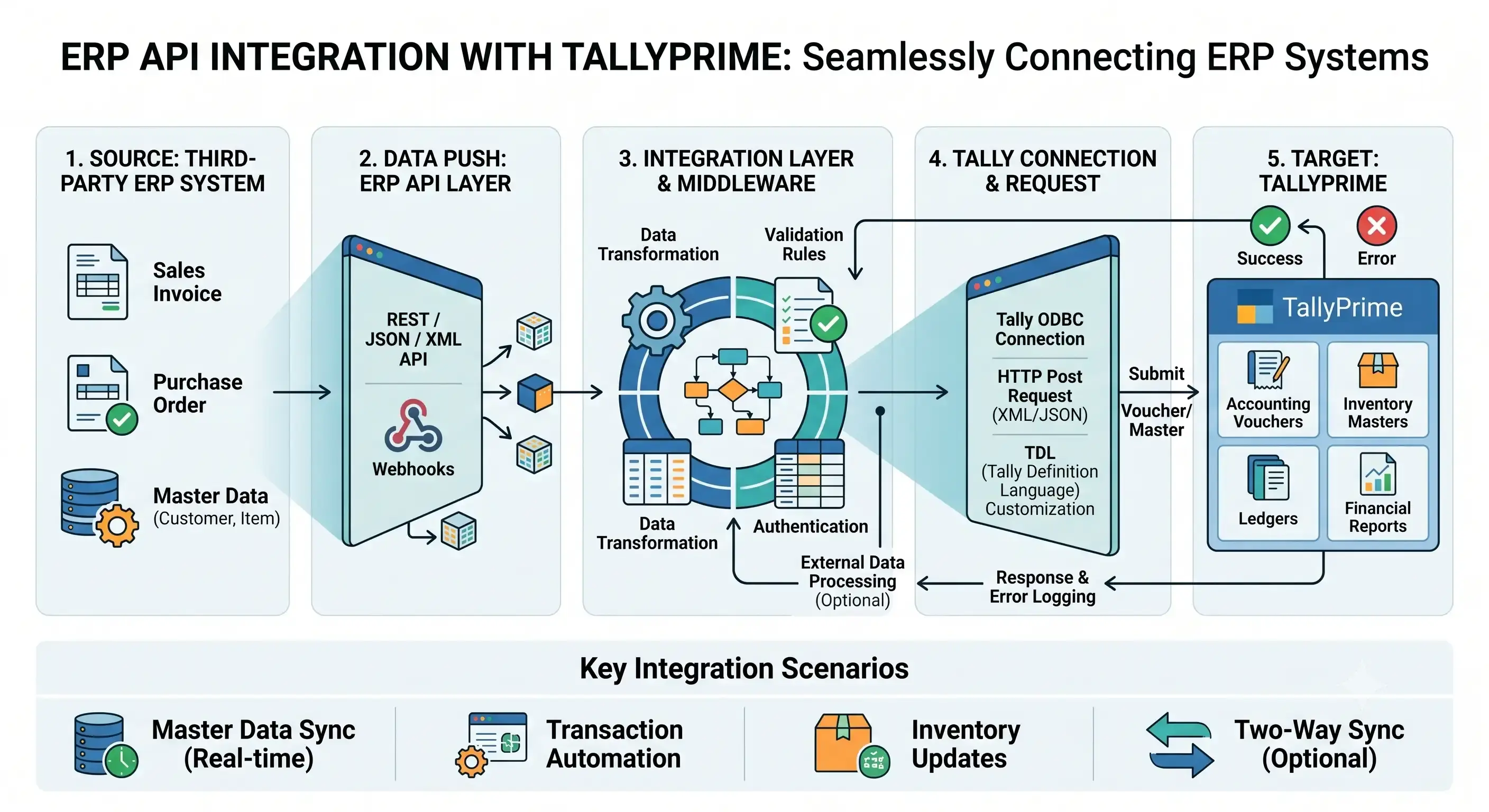
CRM integration with TallyPrime means building a connected workflow between the CRM system and TallyPrime, enabling required business data to be transferred seamlessly in a structured manner.
A typical workflow looks like this:
CRM → Integration Layer → TallyPrime
And based on requirements:
TallyPrime → Integration Layer → CRM
For example:
Sales-related information can be managed in the CRM, while TallyPrime handles accounting and financial records.
The integration layer helps map, validate, and synchronize data between both systems.
Why Businesses Need CRM and Tally Integration
When CRM and accounting systems operate independently, a disconnect can arise between sales and accounting processes.
Common problems include:
1. Duplicate Data Entry
The sales team enters customer information into the CRM, and the accounting team may need to re-enter that exact information into TallyPrime.
2. Delayed Accounting Updates
There can be delays in updating information in the accounting system after a sales transaction occurs.
3. Customer Data Mismatch
Customer names, contact details, or other master records may differ between the CRM and TallyPrime.
4. Manual Reconciliation
Sales and accounting data often require manual comparison and reconciliation.
5. Limited Sales-to-Finance Visibility
The sales team lacks real-time insight into the customer's accounting status, and the finance team lacks full visibility into the sales pipeline.
CRM integration brings these workflows into a unified, connected architecture.
How Does CRM Integration with TallyPrime Work?
Directly connecting the CRM to TallyPrime is not always the best approach.
Implementation depends on software configurations, APIs, data structure, permissions, and business requirements.
A typical architecture:
↓
API / Integration Layer
↓
Data Mapping & Validation
↓
TallyPrime
↓
Accounting Data
↓
CRM / Dashboard
The purpose of an integration layer goes beyond simple data transfer.
It can perform the following functions for required data:
- Data Mapping
- Validation
- Transformation
- Synchronization
- Provide error-handling workflows
CRM to TallyPrime Data Flow
A common sales workflow:
↓
Customer / Company
↓
Sales Opportunity
↓
Sales Order / Sales Information
↓
Integration Layer
↓
TallyPrime
↓
Invoice / Accounting Record
This allows a structured connection to be established between sales and accounting processes.
However, the exact workflow will depend on business processes and CRM/TallyPrime configurations.
TallyPrime to CRM Data Flow
Integration does not necessarily flow only from the CRM to TallyPrime.
Some businesses may also need to display accounting information back within the CRM.
Example:
↓
Customer Ledger / Invoice Information
↓
Integration Layer
↓
CRM
This provides CRM users access to information such as:
- Invoice status
- Outstanding information
- Payment status
- Customer account information
as per business requirements.
Exact fields and synchronization direction depend on implementation requirements.
Customer Data Synchronization
Customer master data is essential for both the CRM and the accounting system.
If customer information is maintained separately across both systems, the likelihood of duplicate records or inconsistent information increases.
In a CRM-TallyPrime integration, customer information can be synchronized according to defined mapping rules.
Example:
| CRM Data | TallyPrime Data |
|---|---|
| Customer Name | Ledger Name |
| Contact Number | Contact Information |
| Billing Address | Address |
| Tax Information | Applicable Tax Details |
| Customer ID | Reference / Mapping ID |
Actual field mapping is defined based on software configuration and business requirements.
Sales and Invoice Integration
Once the sales process is completed in the CRM, the accounting workflow can begin.
For example:
Relevant sales information can be sent to the TallyPrime workflow through the integration.
Key benefits include:
- Reduced repetitive entry
- Faster accounting updates
- Better data consistency
- Less manual reconciliation
- Connected sales and accounting workflow
However, not all steps may be automatically available in every CRM and TallyPrime implementation. Defining the integration scope in advance is crucial.
CRM Integration with TallyPrime Using APIs
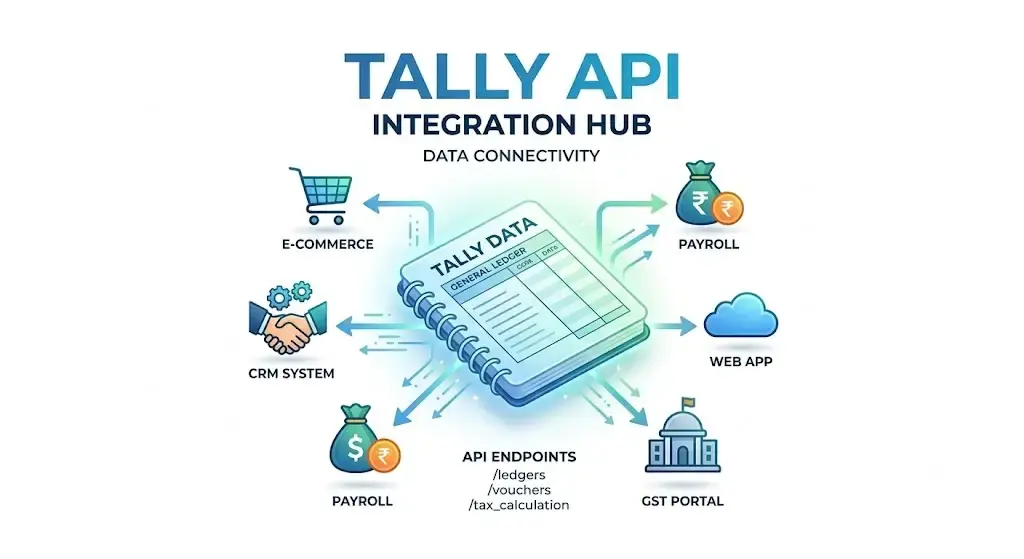
API-based integration is a structured approach to enable seamless data exchange between different software systems.
Typical architecture:
↓
Integration Service
↓
Data Validation
↓
Business Rules
↓
TallyPrime Integration
API integration is particularly useful when a business requires customized workflows.
For example:
- Customer synchronization
- Sales data transfer
- Invoice information
- Payment status
- Outstanding information
- Custom fields
- Automated reporting
API availability and access permissions are critical components of integration feasibility.
CRM + TallyPrime + Business Dashboard
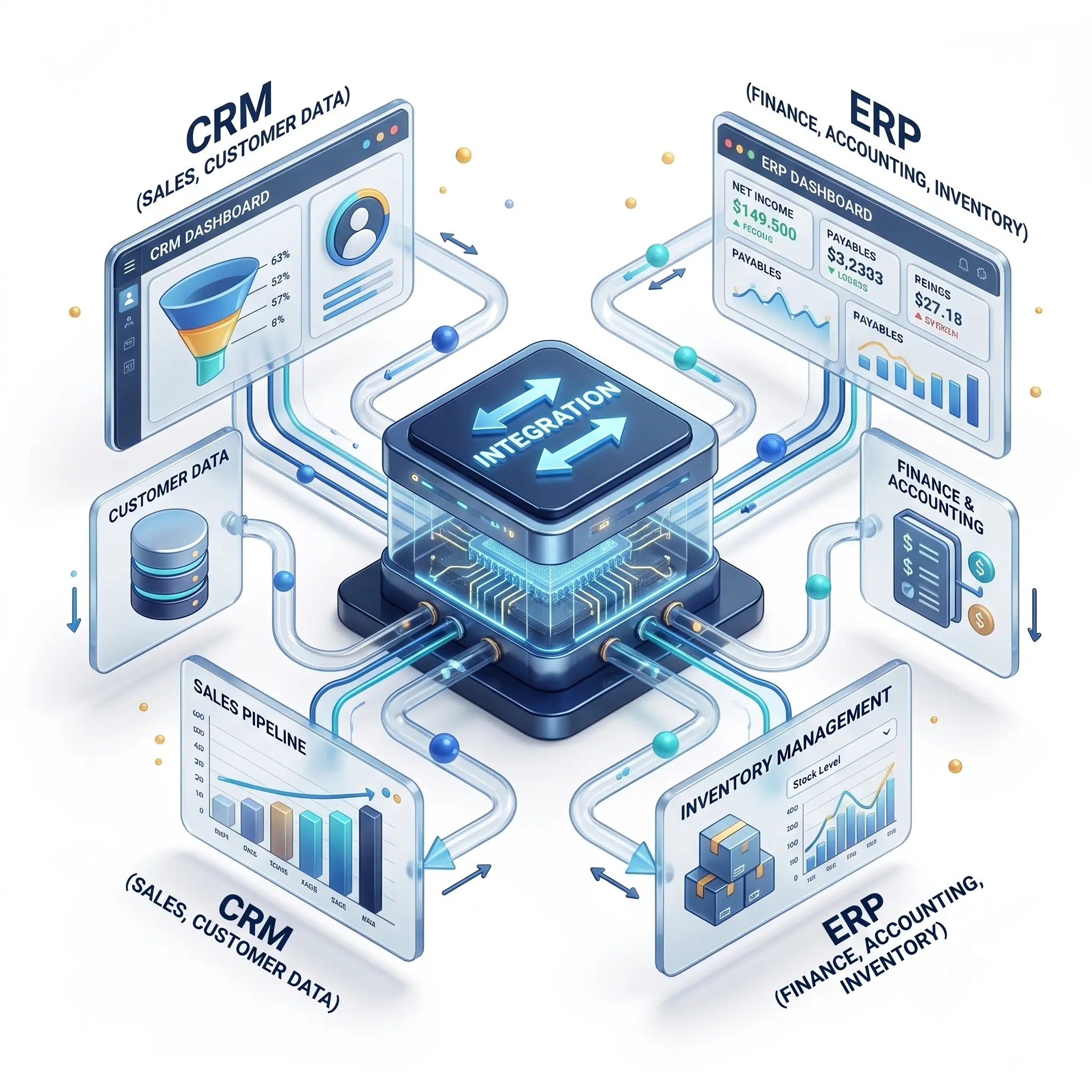
After connecting the CRM and TallyPrime, business reporting can also be centralized.
Example:
│
Tally ───┼──→ Central Dashboard
│
E-commerce ─┘
The dashboard can display key metrics based on business requirements:
- Sales
- Revenue
- Outstanding
- Customer performance
- Sales pipeline
- Product performance
- Branch-wise sales
- Sales vs target
This approach is especially beneficial for businesses with data spread across multiple systems.
Pragyantra's existing AI/Business Dashboard concept similarly focuses on bringing data from diverse business systems into a centralized reporting environment.
CRM Integration for Different Business Types
Common CRM Platforms That Can Be Integrated
CRM integration implementation depends on the CRM platform's capabilities and available integration methods.
Possible CRM environments include:
- Zoho CRM
- Salesforce
- HubSpot
- Freshsales
- LeadSquared
- Custom CRM
- Industry-specific CRM
The integration architecture may vary for each platform.
Therefore, evaluating API availability, authentication, data fields, and business workflows prior to implementation is essential.
CRM and Tally Integration Architecture
A scalable implementation generally includes:
What Data Can Be Integrated?
Integration scope depends on business requirements.
Common data categories include:
| Data | Possible Workflow |
|---|---|
| Customer | CRM ↔ TallyPrime |
| Lead | CRM workflow |
| Sales | CRM → TallyPrime |
| Sales Order | CRM → TallyPrime |
| Invoice | TallyPrime → CRM |
| Payment Status | TallyPrime → CRM |
| Outstanding | TallyPrime → CRM |
| Product | CRM ↔ TallyPrime |
| Reporting Data | Multiple systems → Dashboard |
It is not necessary for every implementation to synchronize all data types.
CRM Integration Implementation Process
Step 2: Integration Requirements: Define key parameters:
- What data will be transferred?
- In which direction will it flow?
- At what frequency will sync occur?
- Which fields are required?
Benefits of CRM Integration with TallyPrime
A properly designed integration can help businesses:
Reduce Manual Work: Reduce repetitive data entry.
Improve Data Consistency: Defined mapping and validation rules help reduce duplicate and inconsistent data.
Connect Sales and Accounting: Create connected workflows between sales and finance teams.
Improve Reporting: Generate centralized reports using relevant data from multiple systems.
Reduce Reconciliation Work: Connected data flow reduces the need for manual comparison.
Support Business Growth: The integration architecture can expand alongside business growth.
CRM Integration vs Manual Data Entry
| Manual Workflow | CRM + TallyPrime Integration |
|---|---|
| Repeated data entry | Structured data transfer |
| Higher manual dependency | Automated workflow where configured |
| Delayed updates | Faster synchronization |
| Manual reconciliation | Connected data flow |
| Multiple disconnected records | Defined mapping |
| Limited visibility | Better cross-system visibility |
The goal of integration is not to remove human accounting controls, but to structure workflows by reducing repetitive data movement.
How Much Does CRM Integration with TallyPrime Cost?
The cost of CRM and TallyPrime integration is not fixed.
Pricing generally depends on:
- CRM platform
- TallyPrime environment
- Number of systems
- Number of data fields
- Integration direction
- API requirements
- Custom business rules
- Data volume
- Sync frequency
- Dashboard/reporting requirements
- Security requirements
- Ongoing support
Therefore, understanding integration requirements and existing workflows is essential to provide an accurate estimate.
Why Choose Pragyantra for CRM Integration with TallyPrime?
Pragyantra's approach goes beyond simply connecting software.
Integration planning focuses on:
- Business workflow
- TallyPrime integration
- API connectivity
- Data mapping
- Validation
- Automation
- Reporting
- Custom requirements
If a business uses CRM, TallyPrime, e-commerce, or other applications, a structured integration architecture can be designed across these systems.
Frequently Asked Questions
Can CRM be integrated with TallyPrime?
Yes, an integration workflow can be built between CRM and TallyPrime. The exact implementation depends on the CRM platform, TallyPrime environment, APIs, and business requirements.
Can CRM data be transferred to TallyPrime?
Yes, required customer or sales data can be transferred to the TallyPrime workflow according to defined mapping and integration rules.
Can TallyPrime data be shown in CRM?
A TallyPrime-to-CRM integration workflow can be established to display select accounting information within the CRM, depending on technical feasibility and requirements.
Can Zoho CRM be integrated with TallyPrime?
Integration between Zoho CRM and TallyPrime can be implemented through a customized architecture, defined according to exact field and workflow requirements.
Is API required for CRM and TallyPrime integration?
The technical approach varies by integration. API-based integration is common, but the final architecture depends on available integration methods and business needs.
Can CRM integration reduce manual data entry?
Yes. Where repetitive data transfer can be automated, CRM-TallyPrime integration helps reduce manual data entry.
Can CRM and TallyPrime integration include dashboards?
Yes. Relevant data from CRM and TallyPrime can be utilized in a centralized dashboard or BI reporting system.
Connect Your CRM With TallyPrime
If your sales team works in CRM and your accounting team uses TallyPrime, disconnected systems can result in unnecessary manual work.
CRM Integration with TallyPrime helps establish a connected sales-to-accounting workflow.
With Pragyantra, you can discuss a customized integration architecture for your CRM, TallyPrime, and other business systems.
Want to connect your CRM with TallyPrime?
🏢 Pragyantra Solutions | Helpline: +91 77280 57558 | Web: www.pragyantra.com