

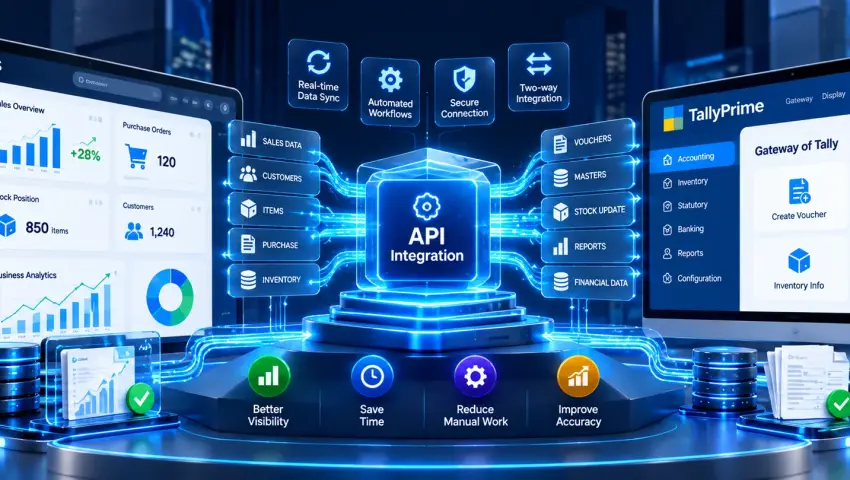

ERP API Integration with TallyPrime: How to Connect ERP Systems with Tally
Introduction
Many businesses use more than one software system to manage their operations.
ERP software may handle production, purchasing, sales or inventory. TallyPrime may be used for accounting and financial management. CRM may manage customers and sales activities, while e-commerce platforms may handle online orders.
The problem starts when these systems work independently.
A transaction may be created in one system but then need to be manually entered into another. Customer information may exist in multiple databases. Inventory figures may not match. Accounting teams may spend time reconciling information from different systems.
This is where ERP API Integration with TallyPrime can become useful.
An ERP-Tally integration creates a structured connection between an ERP system and TallyPrime so that selected business data can move between the systems according to predefined rules.
The exact integration architecture depends on the ERP platform, TallyPrime environment, available APIs, data structure and business requirements.
💡 Quick Answer: What Is ERP API Integration with TallyPrime?
ERP API Integration with TallyPrime is a technology-based connection that allows an ERP system and TallyPrime to exchange selected business data through APIs or other supported integration methods.
Instead of manually moving information between systems, an integration layer can handle data transfer, mapping, validation and synchronization according to the defined workflow.
For example:
ERP → Integration Layer → TallyPrime
or, where required:
TallyPrime → Integration Layer → ERP
The integration can be designed around specific data such as customers, products, sales, purchases, invoices or inventory, depending on the business requirement. Explore broader Tally Integration Services for cross-platform workflows.
Why Do Businesses Integrate ERP with TallyPrime?
ERP systems and accounting systems often have different responsibilities.
An ERP may manage operational processes, while TallyPrime may be used for accounting and financial records.
When these systems are disconnected, businesses may face:
1. Repeated Data Entry
The same customer, product or transaction information may need to be entered into multiple systems.
2. Delayed Accounting Updates
Information created in the ERP may not immediately reach the accounting workflow.
3. Data Inconsistency
Different systems can contain different versions of customer, product or transaction information.
4. Manual Reconciliation
Teams may need to compare records from multiple systems to identify differences.
5. Reporting Delays
Management reports may require data from both operational and accounting systems.
6. Higher Operational Dependency
Employees may spend significant time moving information instead of working on higher-value tasks.
An integration architecture can reduce unnecessary manual data movement where the workflow is suitable for automation.
How Does ERP API Integration with TallyPrime Work?
A typical integration can be structured like this:
↓
ERP API
↓
Integration Layer
↓
Data Mapping
↓
Validation & Business Rules
↓
TallyPrime
↓
Accounting Data
The reverse direction may also be required:
The integration layer acts as the bridge between the two systems.
It can handle tasks such as:
- Data extraction
- Field mapping
- Data transformation
- Validation
- Authentication
- Synchronization
- Error handling
- Logging
The exact architecture should be designed after understanding the systems involved. For customized web endpoints, explore our specialized Tally API Integration Services.
What Data Can Be Integrated Between ERP and TallyPrime?
There is no universal list of fields that applies to every ERP-TallyPrime integration.
The data scope depends on business requirements.
Common integration areas can include:
| Data Type | Possible Integration |
|---|---|
| Customer | ERP → TallyPrime |
| Supplier | ERP → TallyPrime |
| Product | ERP ↔ TallyPrime |
| Sales Order | ERP → TallyPrime |
| Purchase Order | ERP → TallyPrime |
| Sales Data | ERP → TallyPrime |
| Purchase Data | ERP → TallyPrime |
| Invoice Information | ERP ↔ TallyPrime |
| Inventory Information | ERP ↔ TallyPrime |
| Payment Information | TallyPrime → ERP |
| Outstanding Information | TallyPrime → ERP |
| Reporting Data | ERP + TallyPrime → Dashboard |
Not every business needs every data type.
A good integration starts with identifying exactly which data needs to move, in which direction and under what conditions.
ERP to TallyPrime Integration
One of the most common requirements is transferring operational data from an ERP system into TallyPrime.
A simplified workflow could look like:
For example, a business may create sales information in its ERP system.
Instead of manually re-entering all relevant information into TallyPrime, the integration can transfer the required data according to predefined rules.
This can help reduce repetitive work.
However, the exact transaction flow depends on the ERP's data structure and TallyPrime configuration.
TallyPrime to ERP Integration
Integration does not always need to be one-way.
Some businesses also need accounting information from TallyPrime to be available inside their ERP.
A possible workflow is:
This can help operational teams access relevant financial information without manually requesting reports from the accounting team.
Examples may include:
- Invoice status
- Payment status
- Customer outstanding
- Accounting references
- Financial reporting data
The exact fields should be defined during integration planning.
ERP API Integration vs Manual Data Entry
| Manual Process | ERP API Integration |
|---|---|
| Repeated data entry | Structured data transfer |
| Higher manual dependency | Reduced repetitive work |
| Possible copy-paste errors | Validation rules can be applied |
| Delayed updates | Automated or scheduled synchronization |
| Manual reconciliation | Connected data workflow |
| Multiple disconnected records | Defined data mapping |
| Limited cross-system visibility | Better information flow |
Integration does not mean that every business process should become fully automated.
Accounting controls, approvals and human review can still remain part of the workflow.
What Is an Integration Layer?
The integration layer is the technical bridge between ERP and TallyPrime.
Instead of creating a complicated direct dependency between every system, businesses can use an intermediate layer to control data exchange.
For example:
This layer can be responsible for:
Data Mapping: Matching ERP fields with the corresponding TallyPrime fields.
Data Transformation: Changing the structure or format of data when required.
Validation: Checking whether required information is available before transferring it.
Business Rules: Applying predefined conditions before a transaction moves to another system.
Error Handling: Recording failed or incomplete transactions so they can be investigated.
Logging: Maintaining technical information about synchronization activity.
ERP and TallyPrime Data Mapping
Data mapping is one of the most important parts of integration.
For example:
| ERP Field | TallyPrime Mapping |
|---|---|
| Customer Name | Ledger / Customer |
| Product Code | Stock Item |
| Product Name | Stock Item Name |
| Quantity | Quantity |
| Unit Price | Rate |
| Tax Information | Applicable Tax Structure |
| Invoice Reference | Voucher Reference |
| Payment Reference | Payment Information |
These are only examples.
Actual mappings depend on the ERP and TallyPrime configuration.
A proper mapping document should be prepared before development begins.
Why Data Validation Matters
Moving incorrect data automatically can create bigger problems than entering it manually.
For example, if:
- Customer mapping is incorrect
- Product code does not exist
- Required tax information is missing
- Quantity format is incorrect
- Ledger mapping is unavailable
the integration should have a defined way to handle the situation.
Therefore, ERP API integration should include validation rules wherever required.
A basic flow could be:
↓
Validate
↓
Valid?
↙ ↘
Yes No
↓ ↓
Process Error Log
↓
TallyPrime
This creates a more controlled integration workflow.
ERP API Integration for Industry Workflows
ERP API Integration for Manufacturing Businesses
Manufacturing companies often have multiple operational processes. ERP systems may manage:
- Production
- Raw materials
- Purchasing
- Inventory
- Sales
- Production planning
TallyPrime may be part of the accounting workflow. An integration can connect selected operational and accounting data.
For example: ERP Production/Sales Data → Integration Layer → TallyPrime Accounting Workflow
This can reduce the need to manually transfer selected information between systems. The exact scope depends on the manufacturing ERP and accounting process.
ERP API Integration for Distributors
Distributors may manage customers, products, orders, inventory, purchasing, sales and payments. When operational and accounting systems are disconnected, teams may need to manually reconcile information.
An ERP-TallyPrime integration can connect selected workflows.
For example:
Customer → Sales Order → ERP → Integration → TallyPrime → Invoice / Accounting
This can create a more structured sales-to-accounting workflow.
ERP API Integration for Retail Businesses
Retail businesses may have data coming from ERP, POS, E-commerce, inventory systems and accounting software.
If TallyPrime is used for accounting, integration can help connect selected transaction and master data. For larger environments, a centralized integration architecture can be more manageable than maintaining multiple manual processes.
ERP + TallyPrime + Business Intelligence
ERP-TallyPrime integration can also become part of a larger reporting architecture.
For example:
│
TallyPrime ├──→ Central Dashboard
│
CRM ───────┘
This can allow relevant operational and financial information to be brought together for reporting.
Possible dashboard metrics include:
- Sales
- Revenue
- Outstanding
- Product performance
- Customer performance
- Inventory
- Branch performance
- Sales trends
Pragyantra's centralized dashboard concept is built around bringing data from different business systems into a centralized reporting environment. Connect live reporting via Business Intelligence Tools in Dubai & UAE.
API-Based ERP Integration vs File-Based Integration
Different businesses may require different integration approaches.
| Approach | Suitable When |
|---|---|
| API Integration | Systems provide usable APIs |
| Scheduled Data Exchange | Data does not need continuous synchronization |
| Structured File Exchange | Systems support defined import/export formats |
| Custom Integration | Standard connectors are insufficient |
| Integration Platform | Multiple systems need centralized orchestration |
The right approach should be selected after evaluating: system capabilities, data volume, sync frequency, security, business workflow, API availability and technical limitations.
There is no single integration architecture that is correct for every company.
Real-Time vs Scheduled Synchronization
Businesses often ask whether ERP and TallyPrime data should synchronize in real time.
The answer depends on the business requirement.
Real-Time / Near Real-Time: Useful when information needs to move quickly between systems.
Example: Sales Transaction → Integration → Accounting Workflow
Scheduled Synchronization: Useful when immediate synchronization is unnecessary.
Example: ERP → Daily Data Sync → TallyPrime
Hybrid Approach: Some data can be synchronized frequently while other information can be processed periodically.
The synchronization model should match the actual business process rather than being selected simply because it sounds more advanced.
ERP API Integration Implementation Process
Common Mistakes in ERP-TallyPrime Integration
How to Choose an ERP Integration Solution
Before starting an ERP API integration project, businesses should evaluate:
1. ERP Compatibility: Can the ERP expose the required information?
2. TallyPrime Environment: What integration method and environment will be used?
3. Data Requirements: Exactly what data needs to move?
4. Synchronization Frequency: Does the business need real-time, scheduled or event-based synchronization?
5. Security: How will authentication and data access be managed?
6. Error Handling: How will failed transactions be identified?
7. Scalability: Can the architecture support future requirements?
When Should You Integrate ERP with TallyPrime?
ERP API integration may be worth considering when:
- Teams repeatedly enter the same data
- ERP and accounting systems are disconnected
- Manual reconciliation takes significant time
- Business data exists across multiple platforms
- Management needs information from multiple systems
- Transaction volumes are increasing
- Manual workflows are becoming difficult to maintain
However, not every business needs a complex integration.
If the workflow is small and manual processing is already efficient, a large integration project may not be necessary.
ERP API Integration with TallyPrime: Key Benefits
Reduce Repetitive Work: Selected data can move automatically instead of being manually copied.
Improve Data Consistency: Defined mapping and validation can help maintain consistency between systems.
Connect Operational and Accounting Workflows: ERP and TallyPrime can work as connected parts of a broader business process.
Improve Visibility: Relevant data can be made available to the right teams.
Support Reporting: Data from multiple systems can be used for centralized reporting.
Create Scalable Architecture: A structured integration layer can make it easier to add additional workflows later.
ERP API Integration with TallyPrime: Example Workflow
Consider a distributor using an ERP for sales and inventory and TallyPrime for accounting.
The workflow could be:
↓
ERP
↓
Sales Order
↓
Integration Layer
↓
Customer + Product Mapping
↓
Validation
↓
TallyPrime
↓
Accounting Workflow
↓
Invoice / Payment Information
↓
ERP / Dashboard
This is only a conceptual example.
The actual architecture should be designed around the company's ERP, TallyPrime setup and accounting workflow. If you also manage customer relationships in a dedicated platform, explore our CRM Integration with TallyPrime guide.
ERP Integration vs Direct Tally Integration
These terms are sometimes used interchangeably, but they can describe different scopes.
Tally Integration is the broader concept of connecting TallyPrime with another application or system.
ERP Integration with TallyPrime specifically focuses on connecting an ERP environment with TallyPrime.
ERP API Integration emphasizes the technical/API layer used to exchange data between the systems.
Therefore, a business looking for ERP API integration should define both the business workflow and technical integration requirements before implementation.
Frequently Asked Questions
What is ERP API Integration with TallyPrime?
It is a structured integration between an ERP system and TallyPrime that allows selected business data to move between the systems through APIs or other supported integration methods.
Can ERP software be integrated with TallyPrime?
Yes, an ERP-TallyPrime integration can be developed when the required integration methods, system capabilities and business requirements support it.
What data can be transferred from ERP to TallyPrime?
Depending on the implementation, data such as customers, products, sales, purchases, orders and other accounting-related information may be included.
Can TallyPrime send data back to an ERP?
Yes, a two-way workflow can be designed where required accounting information is transferred from TallyPrime back to the ERP.
Is API required for ERP-TallyPrime integration?
Not necessarily in every scenario. The technical approach depends on the capabilities of the ERP, TallyPrime environment and required workflow.
How does ERP API integration reduce manual work?
It can automate selected data-transfer processes so employees do not need to repeatedly copy the same information between systems.
Can ERP and TallyPrime data be used in a dashboard?
Yes. Relevant data from ERP and TallyPrime can be combined in a centralized reporting or business intelligence environment, depending on the integration architecture.
How much does ERP API integration with TallyPrime cost?
There is no universal fixed price. Cost depends on the ERP, TallyPrime environment, number of systems, data volume, integration complexity, customization, synchronization requirements and reporting scope.
Is ERP-Tally integration suitable for small businesses?
It can be, particularly when repetitive data entry or reconciliation has become a significant operational issue. However, the required integration scope should be evaluated before implementation.
Conclusion
ERP and accounting systems do not always need to operate as isolated platforms.
With a properly planned ERP API Integration with TallyPrime, businesses can create a structured connection between operational and accounting workflows.
The important part is not simply connecting two software systems.
A successful integration requires:
The architecture should be based on the actual business requirement rather than trying to automate every possible process.
If your business uses an ERP system alongside TallyPrime and you want to reduce repetitive data movement, a structured integration assessment is a good starting point.
Internal Linking Plan
- Primary Commercial: ERP API Integration with Tally
- Broad Commercial: Tally Integration Services
- API Service: Tally API Integration Services
- CRM Cluster: CRM Integration with TallyPrime
- BI Cluster: Business Intelligence Tools in Dubai & UAE
Connect Your ERP with TallyPrime
Pragyantra provides solutions around TallyPrime integration, API integration, ERP connectivity and business automation.
If you are planning to connect an ERP system with TallyPrime, the first step is to understand your current workflow, data requirements and available integration methods.
Talk to Pragyantra about your ERP-TallyPrime integration requirements.
🏢 Pragyantra Solutions | Helpline: +91 77280 57558 | Web: www.pragyantra.com