

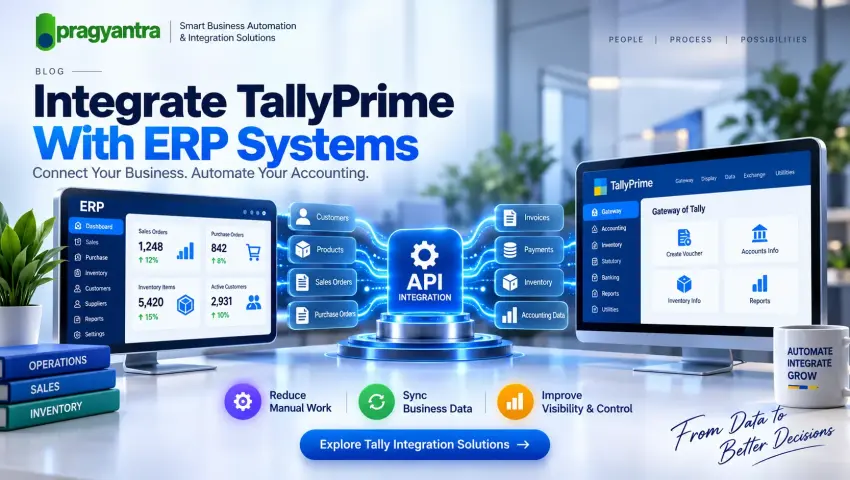

TallyPrime Integration With ERP Systems: A Complete Guide
Modern businesses rarely operate with a single software application. Sales teams may use CRM software, operations teams may use an ERP system, e-commerce teams may manage online orders, while the accounts department uses TallyPrime for accounting.
When these systems work independently, employees often have to transfer information manually.
This is where TallyPrime ERP integration can help.
By connecting TallyPrime with ERP and other business applications, companies can create a more connected workflow for accounting, sales, inventory and reporting.
Pragyantra provides Tally integration, ERP integration and API integration services designed around individual business requirements.
💡 What Is TallyPrime ERP Integration?
TallyPrime ERP integration means connecting TallyPrime with an ERP system or other business software so that selected information can be exchanged between the systems.
A simplified workflow can look like:
ERP System → Integration Layer → TallyPrime
Or, when information needs to move in both directions:
ERP ↔ Integration Layer ↔ TallyPrime
The actual data flow depends on the business requirement.
Common information that businesses may want to integrate includes:
- Customers
- Suppliers
- Products
- Sales
- Purchases
- Inventory
- Invoices
- Payments
- Accounting information
- Business reports
Why Do Businesses Integrate TallyPrime With ERP?
Running ERP and accounting software separately can create repetitive work.
For example:
ERP
↓
Employee exports Excel
↓
Accounts team checks data
↓
Employee enters information into TallyPrime
↓
Data is verified manually
This process can become difficult when transaction volumes increase.
With an appropriately designed integration:
ERP
↓
Integration
↓
TallyPrime
This can reduce repetitive data-transfer activities and create a more structured workflow.
Common TallyPrime ERP Integration Use Cases
1. Sales Integration
Sales transactions generated in an ERP system may need to reach the accounting system.
Possible workflow:
ERP Sales Order
↓
Integration
↓
TallyPrime Sales Workflow
This can help connect operational sales activity with accounting processes.
2. Inventory Integration
Businesses managing large inventories may maintain stock information in an ERP.
Relevant inventory information can be synchronized with TallyPrime depending on the required architecture.
Possible workflow:
ERP Inventory
→ Product Information
→ Stock Updates
→ Integration
→ TallyPrime
3. Purchase Integration
Purchase information can also be connected between systems.
For example:
Purchase Order
↓
ERP
↓
Integration
↓
TallyPrime
This can help reduce duplicate transaction entry.
4. Customer & Supplier Integration
Customer and supplier information may exist in multiple applications.
An integration workflow can synchronize selected master data.
For example:
ERP Customer
→
Integration
→
Tally Ledger
The exact mapping should be defined before implementation.
Tally API Integration for ERP Systems
For customized integration requirements, businesses may consider Tally API integration.
An API-based architecture can provide a structured communication layer between TallyPrime and external applications.
For example:
ERP
↓
API / Integration Layer
↓
TallyPrime
↓
Business Intelligence Dashboard
This architecture can be useful when multiple applications need to exchange information.
Pragyantra's Tally API integration services can be planned around the specific systems, data requirements and business workflows involved.
ERP API Integration vs Traditional Data Transfer
| Area | Manual Transfer | ERP API Integration |
|---|---|---|
| Data movement | Manual | Automated according to configuration |
| Excel dependency | Often high | Can be reduced |
| Repetitive work | High | Can be reduced |
| Synchronization | Manual | System-driven |
| Scalability | Limited | Better suited to growing workflows |
| Error handling | Manual | Can include validation and logging |
| Reporting | May be delayed | Can support connected reporting |
API integration does not automatically guarantee error-free data. Proper mapping, validation, testing and monitoring are still required.
How TallyPrime ERP Integration Works
Step 1: Understand the Business Process
Before development, identify:
- Current ERP workflow
- TallyPrime workflow
- Manual activities
- Required automation
- Systems involved
Step 2: Identify Data
Determine exactly what needs to be exchanged.
For example:
Master Data
- Customers
- Suppliers
- Products
- Ledgers
Transaction Data
- Sales
- Purchases
- Receipts
- Payments
- Invoices
Step 3: Define Data Mapping
ERP and TallyPrime may use different data structures.
A mapping table can define how information moves.
| ERP Field | TallyPrime Field |
|---|---|
| Customer Name | Ledger Name |
| Product Name | Stock Item |
| Sales Order | Sales Transaction |
| Supplier | Party Ledger |
| Invoice | Voucher |
| Payment | Receipt/Payment |
Step 4: Select Integration Method
The appropriate method depends on:
- TallyPrime environment
- ERP system
- API availability
- Data volume
- Security requirements
- Synchronization frequency
- Customization requirements
Step 5: Develop & Test
The integration should be tested with representative business data.
Test areas can include:
- Master creation
- Transaction synchronization
- Duplicate handling
- Data validation
- Failed transactions
- Error logging
- Synchronization timing
Step 6: Deploy & Monitor
After successful testing, the integration can be deployed.
Monitoring helps identify:
- Failed synchronizations
- Invalid data
- API errors
- Duplicate transactions
- Connection issues
Benefits of TallyPrime ERP Integration
Reduced Manual Work: Businesses can reduce repetitive data-transfer activities between systems.
Better Data Flow: Connected systems can exchange defined information through a structured workflow.
Faster Operations: Automating selected processes can reduce unnecessary manual steps.
Improved Visibility: Connected data can support centralized reporting and dashboards.
Better Scalability: A properly designed integration can support evolving business processes.
Tally Automation: ERP integration can become an important component of a wider Tally automation strategy.
TallyPrime Integration for Different Industries
ERP → Production → Inventory → TallyPrime
POS → Inventory → ERP → TallyPrime
Sales → Inventory → ERP → TallyPrime
Website → Orders → ERP → TallyPrime
CRM → Billing → ERP → TallyPrime
The actual integration should always be designed around the company's workflow.
Tally Integration With Business Intelligence
ERP integration can also support management dashboards.
A possible architecture is:
TallyPrime + ERP
↓
Integration Layer
↓
Data Processing
↓
Business Intelligence Dashboard
Management can then use relevant information for monitoring:
- Sales
- Revenue
- Expenses
- Outstanding payments
- Inventory
- Customer performance
- Business trends
This creates a connection between accounting data and management reporting using an AI Business Dashboard.
How to Choose an ERP Integration Service
Before starting an ERP integration service, businesses should document:
Systems: Which applications need to communicate?
Data: What information needs to move?
Direction: Should the data move: ERP → Tally, Tally → ERP, or ERP ↔ Tally?
Frequency: Should synchronization happen:
- On demand?
- At scheduled intervals?
- Near real-time?
- Based on specific events?
Security: How will authentication, access control and data protection be handled?
Error Handling: What should happen when a transaction cannot be synchronized?
These questions help define the actual integration architecture.
Tally API Integration for Growing Businesses
As a business grows, its technology environment can become more complex.
A company might eventually use:
CRM + ERP + E-commerce + Inventory + TallyPrime + BI
Managing these systems manually becomes increasingly difficult.
A structured API integration services approach can help businesses connect selected systems while keeping each application responsible for its intended function.
The goal is not simply to connect everything. The goal is to create a reliable data flow around the business process.
Frequently Asked Questions
What is TallyPrime ERP integration?
It is the process of connecting TallyPrime with an ERP or other business application to exchange selected data according to defined workflows.
Can TallyPrime integrate with an ERP?
Yes, an integration can be developed when the technical environment and required interfaces support the desired workflow.
What is Tally API integration?
Tally API integration uses supported integration mechanisms and APIs to enable communication between TallyPrime and external applications.
Can ERP integration automate Tally?
Integration can automate selected repetitive data-transfer processes, depending on the business workflow and technical implementation.
Can TallyPrime integrate with CRM and ERP together?
A suitable integration architecture can connect TallyPrime with multiple business systems, subject to technical compatibility and defined data flows.
Does ERP integration eliminate manual accounting work?
Not necessarily. It can reduce selected repetitive data-transfer tasks, but accounting review, reconciliation and other controls may still be required.
Conclusion
TallyPrime ERP integration can connect accounting with wider business operations and reduce unnecessary manual data-transfer processes.
Whether your requirement involves Tally integration, Tally API integration, ERP API integration, CRM integration services or Tally automation, the right approach starts with understanding your business workflow and defining exactly what data needs to move between systems.
Pragyantra can help businesses evaluate their requirements and develop a suitable integration workflow.
Internal Linking
Use natural anchor text within the article:
This is the 4th supporting blog in your Tally Integration topic cluster. It strengthens the main /tally-integration and /tally-api-integration-services pages rather than competing with them.
Ready to Connect Your ERP With TallyPrime?
Talk to Pragyantra about your Tally integration requirement and build a connected, automated data workflow across your enterprise.
🏢 Pragyantra Solutions | Helpline: +91 77280 57558 | Web: www.pragyantra.com