
Enable Sorting of Pending Bills by Due Date
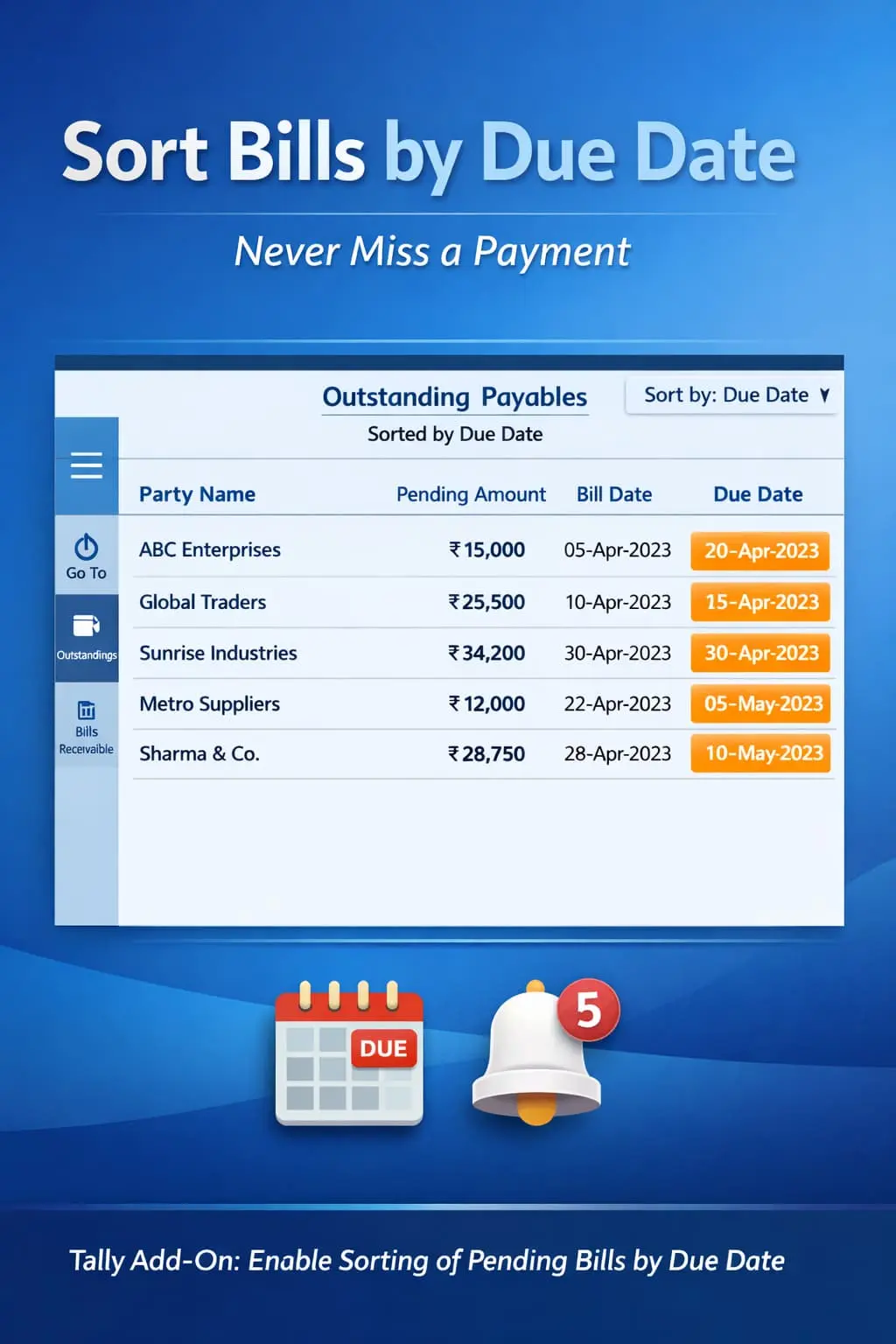
Automatically sort pending bills by due date in TallyPrime with Pragyantra’s add‑on. Improve cash flow, track overdue payments, and manage receivables efficiently.
Elevate Your Business with Our Comprehensive Consulting Services.
Introducing Our New Business Consulting Solutions!
Revolutionize Your Business Strategy with Our Expertise.

Managing pending bills and outstanding payments is a critical task for every business. Whether it’s collecting receivables from customers or clearing payables to suppliers, tracking the actual due dates ensures a healthy cash flow. In standard TallyPrime, pending bills are often listed by voucher date, which leads to:
The Enable Sorting of Pending Bills by Due Date Add‑on by Pragyantra solves this by automatically organizing your outstanding reports based on their urgency.
This add‑on is a custom Tally module that reorganizes the visual structure of your outstanding reports. With this add‑on installed, Tally can:
In accounting, time is money. A bill that was generated 30 days ago might have a 60-day credit, while a bill generated yesterday might be due today. Sorting by "Voucher Date" doesn't help here. The Pragyantra Due Date Sorting Add‑on ensures priority-based bill management, making your finance department more proactive and less reactive.
Due Date Based Sorting
Instantly re-orders the Outstanding Receivables and Payables reports by the 'Due On' date.
Overdue Bill Identification
Spot bills that have already crossed their credit limit at the very top of your report.
Universal Report Integration
Works seamlessly across Bill-wise Details, Ledger Outstandings, and Group Outstandings.
Ascending & Descending Support
Flexibility to view the most recent dues or the oldest pending amounts first.
Lightweight & High Performance
Optimized TDL architecture that sorts thousands of pending bills in milliseconds without affecting Tally's speed.
This add‑on works with:
✔ TallyPrime
✔ Tally ERP 9
1. Does this add-on change my original voucher data?
No. This is purely a reporting enhancement. It only changes how the data is displayed in your outstanding reports for better analysis.
2. Can I still sort by 'Bill Date' if I need to?
Yes. The add-on provides a smart default sort by Due Date, but you can always use Tally's standard sorting options to switch back whenever required.
3. Does it work for both Customers and Suppliers?
Absolutely. It works for both Outstanding Receivables (Customers) and Outstanding Payables (Suppliers) simultaneously.
4. Will the sorted order appear in the printed Outstanding Statement?
Yes. Since the report is sorted on-screen, the same organized order will be maintained when you print or email the statement to your parties.
Stop scrolling and start collecting. Organize your pending bills by due date and streamline your business cash flow with Pragyantra.
👉 Contact Pragyantra today to organize your Tally outstanding reports for maximum efficiency.
Your email address will not be published. Required fields are marked *
Please login to write review!
Looks like there are no reviews yet.