Enable Employee Image in Payroll for TallyPrime
Display Employee Photos in Payroll Records for Better Identification
Introduction
In many organizations, payroll management involves handling multiple employee records such as salary details, attendance, payroll reports, and employee information. When companies manage a large workforce, it can sometimes be difficult to quickly identify employees using only names or employee IDs.
The Enable Employee Image in Payroll Add‑on for TallyPrime developed by Pragyantra solves this problem by allowing businesses to display employee photos directly within payroll records in Tally.
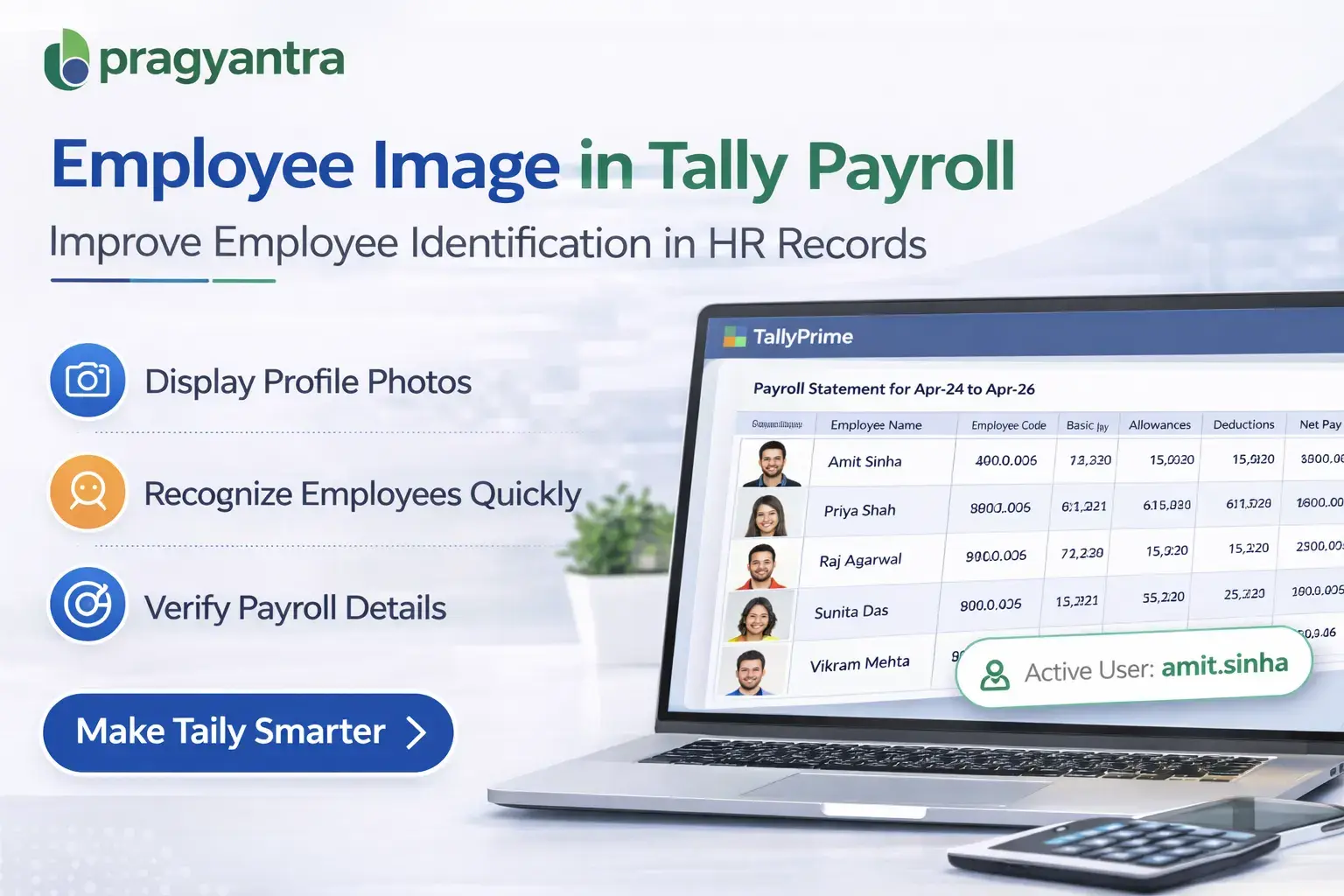
With this add‑on, organizations can attach and display employee images alongside payroll details, making it easier for HR teams and administrators to verify employee identities and manage payroll information more efficiently.
This feature enhances employee identification, HR record management, and payroll transparency within the Tally system.
What is “Enable Employee Image in Payroll”?
The Enable Employee Image in Payroll Add‑on is a custom Tally module that allows businesses to store and display employee photographs in the payroll section of Tally.
Normally, Tally payroll records contain employee details such as:
- Employee name
- Employee ID
- Designation
- Department
- Salary structure
However, employee photographs are not displayed by default.
With this add‑on installed, companies can attach employee profile images to their payroll records. These images are then visible in employee masters, payroll reports, and other HR-related screens within Tally.
This helps organizations maintain better employee identification and organized HR records.
Why Businesses Need This Add‑on
Many companies manage payroll for dozens or even hundreds of employees. When employee records contain only text information, it may become difficult for HR teams to quickly identify the correct employee.
This can lead to issues such as:
- Confusion between employees with similar names
- Difficulty verifying employee details
- Challenges in payroll record management
- Lack of visual identification in HR systems
The Pragyantra Employee Image in Payroll Add‑on solves these challenges by adding visual employee identification within the Tally payroll system.
Key Features of the Add‑on
Employee Photo Display in Payroll
The add‑on allows businesses to attach employee images directly to their payroll records in Tally. This makes employee identification quick and easy.
Improved Employee Identification
Displaying employee photos helps HR teams verify employee records more accurately.
Integrated with Employee Master
Employee images can be linked with the Employee Master record, ensuring that all payroll information is organized in one place.
Lightweight and Fast
The add‑on is built using optimized TDL architecture, ensuring that Tally performance remains fast and stable.
Easy Configuration
Pragyantra provides quick installation and simple configuration so businesses can start using the feature immediately.
Business Benefits
- Better HR Record Management: Employee records become more organized and easier to manage.
- Improved Employee Identification: HR teams can quickly verify employee details using visual identification.
- Reduced Errors in Payroll Processing: Employee images help prevent confusion between employees with similar names.
- Professional HR System: Adding employee photos improves the professionalism of payroll and HR records.
Use Cases
This add‑on is especially useful for:
- Companies with Large Workforces: Organizations managing payroll for many employees benefit from visual employee identification.
- HR Departments: HR teams can quickly identify employees in payroll systems.
- Manufacturing and Industrial Companies: Where large employee databases need structured HR records.
- Service Organizations: Where payroll management involves multiple employees across departments.
Compatibility
This add‑on works with:
✔ TallyPrime
✔ Tally ERP 9
FAQ
What is Enable Login Username in Gateway of Tally?
It is a Tally add‑on that displays the username of the logged‑in user directly on the Gateway of Tally screen.
Why is this feature useful?
It helps businesses identify which user is currently working in the accounting system, especially in multi‑user environments.
Does this add‑on work with TallyPrime?
Yes. The add‑on is fully compatible with TallyPrime and Tally ERP 9.
Is this useful for multi‑user accounting systems?
Yes. It is especially useful for businesses where multiple employees access the same Tally installation.
FAQ
What is Enable Login Username in Gateway of Tally?
It is a Tally add‑on that displays the username of the logged‑in user directly on the Gateway of Tally screen.
Why is this feature useful?
It helps businesses identify which user is currently working in the accounting system, especially in multi‑user environments.
Does this add‑on work with TallyPrime?
Yes. The add‑on is fully compatible with TallyPrime and Tally ERP 9.
Is this useful for multi‑user accounting systems?
Yes. It is especially useful for businesses where multiple employees access the same Tally installation.
Enhance Your HR & Payroll Management
Improve employee identification and maintain professional payroll records with Pragyantra's custom Tally solutions.
👉 Contact Pragyantra today to install this add-on in your Tally system.