Enable Outstanding Bills in Group Summary for TallyPrime
View Outstanding Bills Directly in Group Summary Reports
Introduction
For businesses that manage multiple customers and large volumes of transactions, tracking outstanding bills efficiently is essential for maintaining healthy cash flow. Accountants often rely on Group Summary reports in TallyPrime to analyze financial positions across ledgers and account groups.
However, the default Group Summary in Tally does not always provide detailed visibility of individual outstanding bills within the group report. Users usually need to open individual ledger reports to view pending invoices or bills.
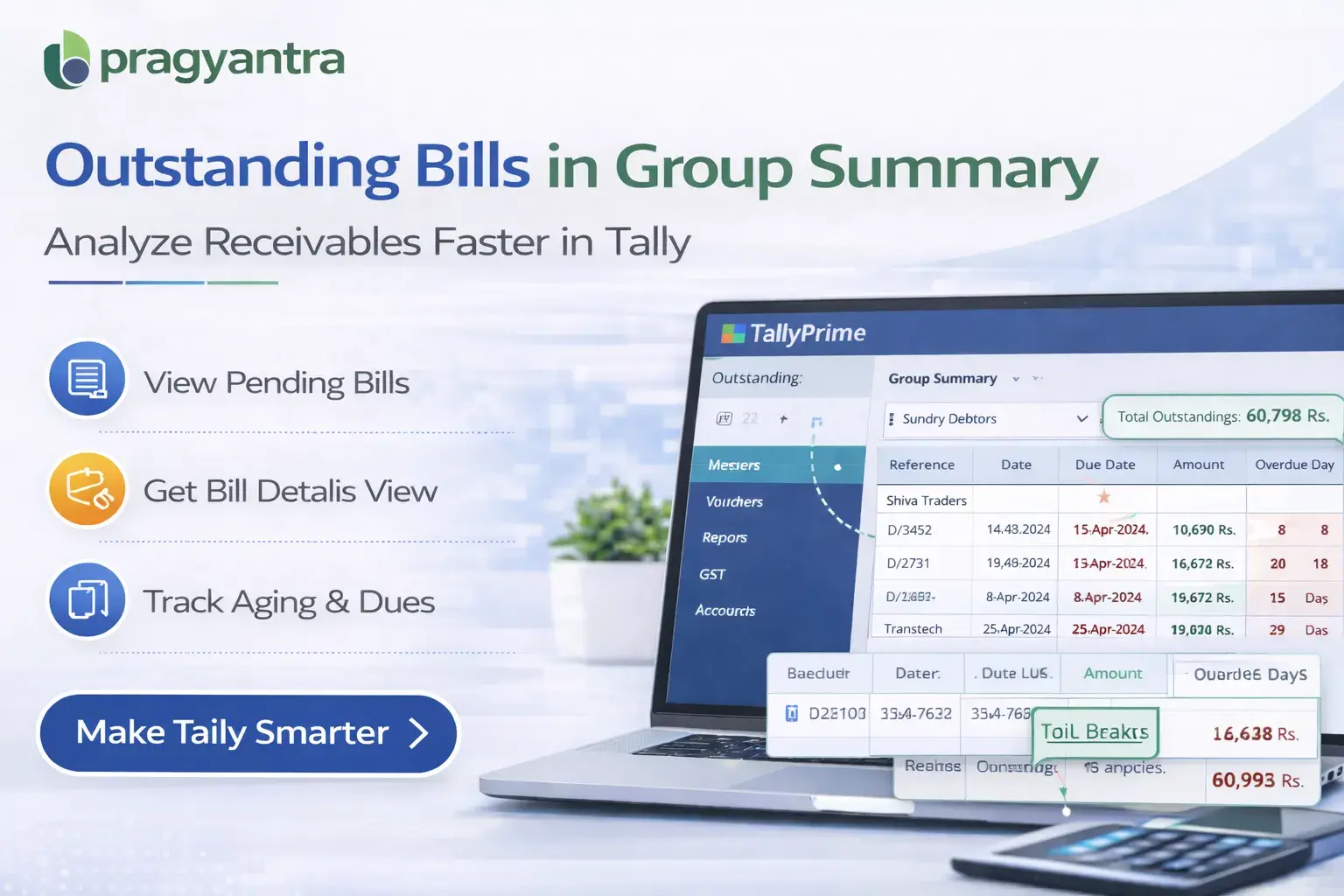
The Enable Outstanding Bills in Group Summary Add‑on developed by Pragyantra enhances the Group Summary report by displaying outstanding bills directly within the summary view.
With this add‑on, accountants can quickly analyze pending invoices across multiple customers without navigating to separate reports, improving financial visibility, receivable tracking, and payment follow‑ups.
What is “Enable Outstanding Bills in Group Summary”?
The Enable Outstanding Bills in Group Summary Add‑on is a custom Tally module that improves the Group Summary report by showing detailed outstanding bill information within the report.
Normally, Group Summary reports display:
- Ledger groups
- Total balances
- Account summaries
But they do not show individual outstanding bill details. With this add‑on installed, users can view:
- Outstanding bill references
- Pending invoice amounts
- Bill‑wise outstanding details within group reports
This allows accountants to analyze receivables across multiple accounts more efficiently.
Why Businesses Need This Add‑on
Businesses dealing with numerous customers often need to monitor outstanding bills across different ledgers or account groups. Without bill‑level visibility in Group Summary, users must manually open each ledger to check pending invoices. This can lead to several challenges:
- Time‑consuming report analysis
- Difficulty tracking multiple outstanding bills
- Limited financial visibility
- Slower payment follow‑ups
The Pragyantra Outstanding Bills in Group Summary Add‑on solves these issues by displaying bill‑wise outstanding information directly in the summary report.
Key Features of the Add‑on
Outstanding Bills Display in Group Summary
The add‑on shows individual outstanding bills directly within the Group Summary report.
Bill‑Wise Receivable Tracking
Users can view outstanding invoice references without opening individual ledger reports.
Improved Financial Reporting
Accountants gain a clearer view of receivables across ledger groups.
Lightweight and High Performance
The add‑on is built using optimized TDL architecture, ensuring smooth performance without slowing down Tally.
Easy Installation and Configuration
Pragyantra provides quick installation and configuration so businesses can start using the feature immediately.
Business Benefits
- Faster Outstanding Analysis: Users can quickly analyze pending bills within group reports.
- Improved Receivable Management: Businesses can track outstanding invoices more efficiently.
- Better Financial Visibility: Outstanding bill details provide deeper insights into receivable balances.
- Increased Productivity: Accounting teams save time by avoiding manual navigation between reports.
Use Cases
- Trading Businesses: Where multiple customer invoices remain outstanding.
- Distribution Companies: Where businesses track receivables across large customer bases.
- SMEs: Where accounting teams rely on summary reports for financial analysis.
- Finance Departments: Where outstanding balances are monitored regularly.
Compatibility
This add‑on works with:
✔ TallyPrime
✔ Tally ERP 9
Frequently Asked Questions (FAQ)
1. What is the benefit of viewing outstanding bills in Group Summary?
It saves time by allowing you to see individual pending invoices across all ledgers in a group (like Sundry Debtors) without having to open each customer ledger separately.
2. Can I see the bill reference number in the summary report?
Yes, this add-on displays the specific bill reference or invoice number directly within the Group Summary view.
3. Is this add-on compatible with TallyPrime?
Absolutely. It is fully compatible with TallyPrime and Tally ERP 9 versions.
4. Does it show the pending amount for each bill?
Yes, it provides a bill-wise breakup of the pending amount so you can track exactly which invoice is unpaid.
Analyze Your Receivables Faster Than Ever
Get bill-level visibility directly in your Group Summary reports. Simplify your Tally workflow with Pragyantra.
👉 Contact Pragyantra today for advanced Tally Customization & Support.