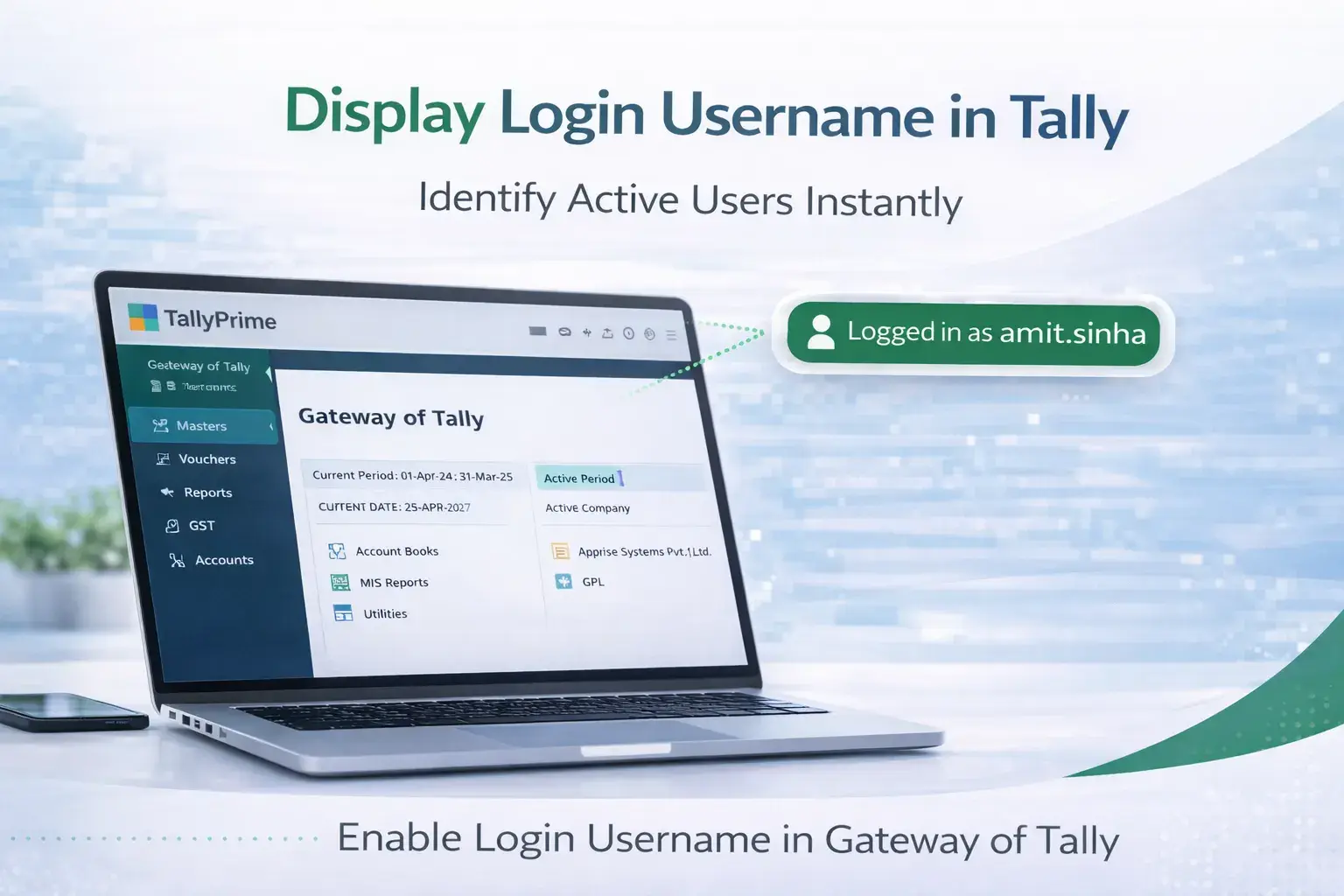
Enable Login Username in Gateway of Tally
Track Active Users Easily in Your Tally System
Introduction
In many businesses, multiple employees work on the same TallyPrime or Tally ERP accounting system. Accountants, data entry operators, and finance staff often access Tally from shared computers or multi‑user networks. In such environments, it can sometimes be difficult to identify which user is currently logged into the system.
The Enable Login Username in Gateway of Tally Add‑on developed by Pragyantra solves this problem by displaying the logged‑in username directly on the Gateway of Tally screen.
Once this add‑on is installed, the system automatically shows the name of the active user whenever Tally is opened. This allows administrators, managers, and team members to quickly identify who is currently working in the accounting system.
This simple yet powerful feature improves system transparency, user accountability, and operational monitoring, especially in organizations where multiple employees use Tally simultaneously.
What is “Enable Login Username in Gateway of Tally”?
The Enable Login Username in Gateway of Tally Add‑on is a custom Tally module that displays the username of the currently logged‑in user directly on the main screen of Tally.
Normally, Tally does not prominently display the active username on the Gateway screen. As a result, when multiple users share the same system, it may not be immediately clear who is currently logged in.
With this add‑on installed, the system automatically captures the login information and displays the username clearly on the Gateway of Tally interface.
This makes it easier for businesses to monitor user activity and maintain better visibility of their accounting operations.
Why Businesses Need This Add‑on
Many organizations operate in a multi‑user Tally environment, where several employees work on accounting tasks such as:
- Sales billing
- Purchase entries
- Payment processing
- Ledger management
- Financial reporting
Without a clear display of the logged‑in username, it can sometimes become confusing to identify the active user on the system.
This can lead to challenges such as:
- Difficulty identifying the current operator
- Reduced system transparency
- Lack of accountability in shared systems
- Confusion in multi‑user environments
The Pragyantra Login Username Display Add‑on eliminates these problems by ensuring that the username of the active user is always visible on the Tally interface.
Key Features of the Add‑on
Display Login Username on Gateway Screen
The add‑on automatically shows the username of the logged‑in user on the Gateway of Tally screen. This allows users and administrators to instantly identify who is currently operating the system.
Perfect for Multi‑User Environments
This add‑on is especially useful for organizations where multiple employees access Tally using different login credentials. The system clearly displays the active user, improving accountability and transparency.
Lightweight and High Performance
The add‑on is developed using optimized TDL architecture, ensuring that it works efficiently without slowing down the Tally system.
Easy Installation and Configuration
Pragyantra provides a simple installation and configuration process, allowing businesses to enable this feature quickly without complex setup.
Business Benefits
Improved System Transparency
Managers and administrators can easily identify which employee is currently logged into the accounting system.
Better User Accountability
Displaying the username helps maintain clear responsibility for system usage.
Simplified Monitoring
Administrators can monitor system usage more effectively without checking system logs.
Ideal for Shared Systems
Businesses that use shared computers or network‑based Tally installations can benefit significantly from this feature.
Use Cases
This add‑on is especially useful for:
- Accounting Firms: Where multiple accountants work on the same Tally installation.
- SMEs: Where accounting systems are shared by several employees.
- Businesses with Multi‑User Tally Setup: Where multiple departments access the same accounting software.
- Companies Using Centralized Accounting Systems: Where administrators need visibility of active users.
Compatibility
This add‑on works with:
✔ TallyPrime
✔ Tally ERP 9
FAQ
What is Enable Login Username in Gateway of Tally?
It is a Tally add‑on that displays the username of the logged‑in user directly on the Gateway of Tally screen.
Why is this feature useful?
It helps businesses identify which user is currently working in the accounting system, especially in multi‑user environments.
Does this add‑on work with TallyPrime?
Yes. The add‑on is fully compatible with TallyPrime and Tally ERP 9.
Is this useful for multi‑user accounting systems?
Yes. It is especially useful for businesses where multiple employees access the same Tally installation.
Monitor Your Tally System More Effectively
Improve transparency and track active users easily with the Login Username Display Add-on for TallyPrime.
👉 Contact Pragyantra today to install this add-on in your Tally system.